
Quick Summary
To properly test automatic gate capacitor health when an operator hums or operates sluggishly, homeowners must completely isolate all power sources and safely discharge stored electrical energy with a rated resistor. Measuring capacitance with a digital multimeter allows you to verify if the microfarad reading matches manufacturer tolerances or if internal degradation requires a replacement unit. Readers will understand step-by-step diagnostic safety procedures and can contact Ironworks Gate Co. for same-day professional testing and component replacement if working around high-voltage electronics is unsafe.
How to Test an Automatic Gate Capacitor: Step-by-Step Diagnostic Guide
When an automated gate refuses to budge, starts moving at a crawl, or produces a deep humming sound from the motor housing, a worn or failed capacitor may be suspected. However, symptoms such as humming, slow movement, or intermittent operation are not conclusive because wiring, mechanical binding, switches, or the motor itself can cause similar problems.
Gate operators can contain hazardous voltages and multiple power sources. If safe isolation or testing cannot be confirmed, contact a qualified technician. Before considering replacement parts, you can safely isolate and evaluate the capacitor with a digital multimeter using the procedures and cautions below.[1] See also Ironworks Gate Co Gate Troubleshooting Steps – 10% Off & Free Estimate – Same-Day Service.
Diagnostic Summary: Tools and Core Steps
Here is what you need and what to observe during the diagnostic process:
- Observed Symptoms: Motor hums without turning, gate moves sluggishly, or operator fails to start (note that these symptoms are not conclusive on their own).
- Required Tools: Digital multimeter with a capacitance setting (µF), insulated needle-nose pliers, insulated screwdriver, and a 20,000-ohm, 5-watt resistor for discharging.
- Pass/Fail Benchmark: The measured capacitance must fall within the tolerance printed on the capacitor or specified by its manufacturer.
Safety standards such as UL 325 address entrapment protection, monitored safety devices, installation, and operational safety; they do not specify capacitor-testing requirements. Component ratings and tolerances are defined by the equipment and capacitor manufacturers. If you cannot safely isolate or test high-voltage circuits or backup systems, consult a qualified technician from Ironworks Gate Co.[3]
What You Need Before Starting
Working around gate electronics requires appropriate protective equipment and tools capable of reading capacitance.
Diagnostic Tools
- Digital Multimeter: Ensure your meter has a dedicated capacitance mode (marked as µF, MFD, or the capacitor symbol).
- 20,000-Ohm, 5-Watt Resistor: Used to safely discharge residual voltage.
- Smartphone: To photograph the wiring layout before disconnecting any terminals.
Protective Equipment
- Insulated Hand Tools: Pliers and screwdrivers rated for electrical service.
- Safety Glasses and Work Gloves: Basic protection when handling electrical components.
Step 1: Disconnect All Power to the Gate Operator
Gate operators can contain hazardous voltages and draw from multiple power sources. Ensure all power is completely isolated before servicing.
- Shut Off the Main AC Breaker: Locate the dedicated breaker in the electrical subpanel, shut it off, and secure the panel.
- Turn Off the Operator Power Switch: Open the operator chassis and turn off the internal master power switch.
- Disconnect DC Battery Backups: Disconnect the leads to any emergency backup batteries.
- Isolate Solar Panels: If the system uses solar power, disconnect the solar charging harness.
Step 2: Safely Discharge the Capacitor
Capacitors can store hazardous voltage even after main power is disconnected. Never bridge the terminals with a bare screwdriver or conductive tool.
- Put on safety glasses and insulated gloves.
- Hold the body of the 20,000-ohm, 5-watt resistor using insulated pliers.
- Press the resistor leads across the capacitor terminals and hold them firmly in place for approximately five seconds.
- Set your multimeter to DC Volts and measure across the terminals to verify voltage. If residual voltage remains, reapply the resistor until the voltage is completely eliminated.
Step 3: Inspect for Physical Signs of Failure
Need test automatic gate capacitor?
We’re available now - call for a fast, free estimate.
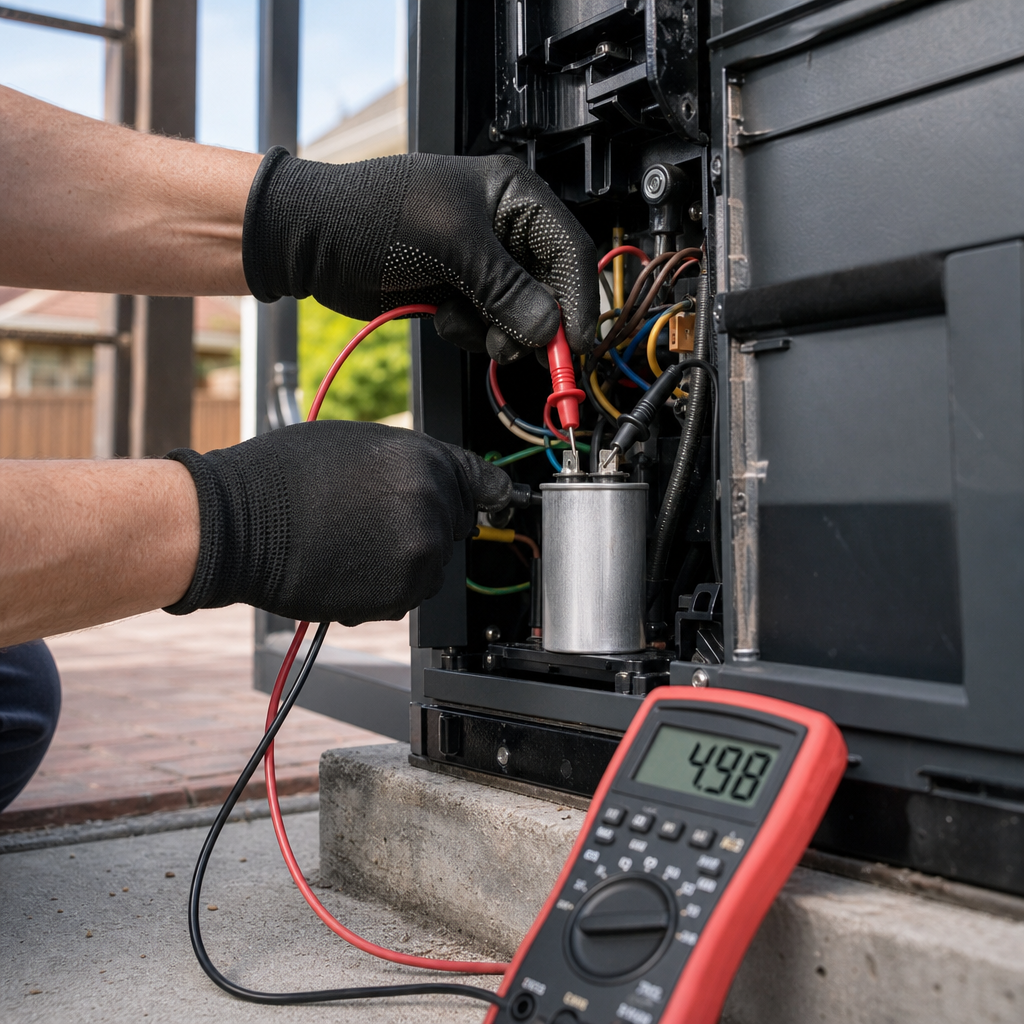
A visual inspection may show visible damage before electrical testing:
- Bulging or Swollen Top: The casing or end cap is domed or deformed.
- Oil or Electrolyte Leakage: Oily residue or fluid around the terminals or inside the enclosure.
- Scorching or Burn Marks: Discolored terminals, melted casing, or charred insulation.
If physical damage is present, replace the capacitor according to manufacturer specifications.
Step 4: Disconnect the Capacitor and Measure Capacitance
To obtain an accurate measurement without interference from the control circuit, disconnect the capacitor from the circuit before testing.
- Take a reference photo of the wire connections.
- Disconnect the capacitor from the circuit by removing the wiring connectors using insulated needle-nose pliers.
- Set the digital multimeter to capacitance mode (µF or MFD).
- Place the meter probes across the capacitor terminals.
- Hold the probes steady until the meter displays a stable reading.
Advanced Diagnostics and Load Conditions
Static capacitance testing with a multimeter applies low DC test voltage and may not detect issues that occur under operating load or temperature extremes. Advanced diagnosis under operating conditions requires manufacturer-specific testing procedures or confirmation by a qualified professional like Ironworks Gate Co.
Step 5: Evaluate Your Readings
Locate the microfarad rating and tolerance printed on the capacitor casing.
- Determine Acceptable Range: Use the tolerance printed on the capacitor or specified by its manufacturer to calculate the allowable range.
- Interpret the Meter Reading:
- Within Tolerance: The reading matches the manufacturer’s specified capacitance range.
- Below Tolerance: The measured capacitance has degraded below the allowable threshold.
- OL (Over Limit / Open Loop), Near-Zero, or Unstable Readings: These are possible signs of capacitor failure.
Replacement Considerations
When selecting a replacement capacitor, always refer to the specific operator and capacitor manufacturer’s documentation for approved specifications, ratings, and replacement procedures.
Frequently Asked Questions
Can a faulty capacitor cause a gate motor to hum without opening?
It can be a contributing factor, but humming, sluggish movement, or failure to start are not conclusive indicators of a bad capacitor. Wiring issues, mechanical binding, limit switches, or motor defects can produce identical symptoms.
Can a failing capacitor trip a circuit breaker?
A shorted capacitor or a stalled motor drawing excessive current can cause circuit breakers or thermal overload protectors to trip.
When should I call a professional gate technician?
If you cannot safely isolate all power sources, cannot confirm discharge and voltage verification, or if testing the capacitor does not resolve the issue, contact a qualified technician from Ironworks Gate Co. to perform comprehensive mechanical and electrical diagnostics.[2]
Need test automatic gate capacitor?
We’re available now - call for a fast, free estimate.
Sources
- 1981017835.pdf – ntrs.nasa.gov
- dhf-ts013-12021-code-of-practice-for- … – nottinghamshire.gov.uk
- UL 325 and Gate Installations – dasma.com (2016)
Related reading: How to Fix Sagging Gate Post – Call Now-10% Off – Same-Day Service – Free Estimate
Related reading: Automatic Gate Sensors | Call Now-10% Off | Same-Day Service | Free Estimate
Related reading: Can I Fix Electric Gate Myself Euless – 10% Off & Free Estimate – Same-Day Service
Frequently Asked Questions
Why does my gate capacitor test within normal range on a multimeter but the motor still fails to run?
Standard multimeters test capacitance under low DC voltage, which does not simulate the heavy electrical load or high operating temperatures of an active gate motor. If your capacitor tests within specification but the operator still hums or stalls, Ironworks Gate Co. can perform dynamic electrical load testing to isolate motor winding or control board defects.
Can I replace an automatic gate capacitor with a different microfarad (µF) or voltage rating?
You must match the exact microfarad (µF) rating and tolerance specified by the operator manufacturer to avoid overheating the motor windings or reducing start torque. While installing a replacement with an equal or higher working voltage rating is safe, never use a capacitor with a lower voltage rating than the original unit.
How long do automatic gate run capacitors typically last before failing?
Most automatic gate capacitors have an operational lifespan of 3 to 7 years, depending on cycling frequency and climate exposure. Severe summer heat, humidity, and minor power surges can accelerate electrolyte breakdown, prompting the need for professional testing and same-day replacement from Ironworks Gate Co.
About the author
 |
Marcus Caldwell Marcus Caldwell is a perimeter security specialist with over eight years of experience in access control systems and automated gate solutions. He frequently writes about residential and commercial gate maintenance, focusing on practical troubleshooting and cost-effective repair strategies for property owners in the DFW metroplex. Marcus holds a certification in Automated Gate Systems Design from the American Fence Association. |
Gate not opening, off track, or opener dead?
We’re available now - call for a fast, free estimate.
Call Now - Free Estimate